![Client-Giant-Logo.png]](https://4906993.hs-sites.com/hs-fs/hubfs/Client-Giant-Logo.png?height=50&name=Client-Giant-Logo.png)
You can update your payment method anytime from your Client Giant account.
Update your billing information
1. Log in to your Client Giant account.
2. Click your profile drop-down in the top-right corner.
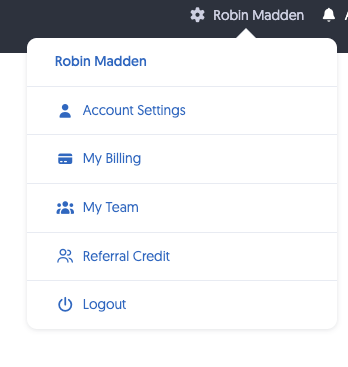
3. Select My Billing.
4. Click the option to add a card.

5. Enter your new card information and save.
6. Make sure to click INVOICES to process any failed invoices.
Your new payment method will then be available for future Client Giant charges.
If you have any trouble updating your billing information, please contact the Client Giant Support team for assistance.